
Your client calls Monday morning asking why their homepage dropped from position 4 to position 9. You open Google Search Console, check the date range, and realize the data is three days stale. By the time you spot the drop, the client already saw it on their own phone.
That lag is exactly why agencies stop relying on manual checks and spreadsheets. A good keyword rank tracker catches movement before the client does, tracks mobile and desktop separately, and hands you a report you didn’t have to build at 11pm. Below is what actually works, what each tool is bad at, and where the free rank tracking tools stop being enough for client work.
What a Rank Tracker Actually Needs to Do for Agency Work
Agencies don’t need a tool that just shows a number next to a keyword. You need location-specific tracking (zip code, not just country), mobile versus desktop splits, and a way to export or white-label a report without screenshotting your own dashboard.
Daily checks matter more for agencies than for solo site owners. A client managing one blog can live with weekly snapshots. An agency running ten client accounts needs to know on Tuesday that a page dropped, not find out from an angry email on Friday. That means your keyword rank tracker needs to run automated daily or near-daily crawls, not just refresh when you remember to click a button.
The other piece people skip: search engine coverage. Most clients only care about Google, but some retail or local clients want Bing or even Amazon visibility tracked too. Check that before committing to annual billing.
Free vs Paid Rank Trackers: What You Actually Give Up
The honest answer is that free tools cap you on keyword volume, update frequency, or both. Here’s how the main options stack up.
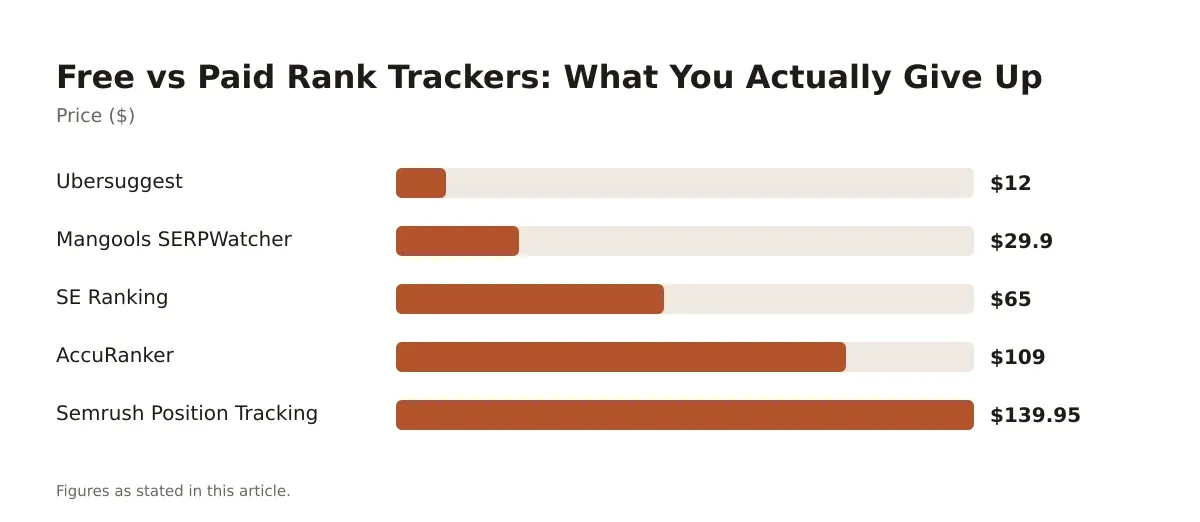
| Tool | Price | Update Frequency | Keyword Limits | Best Fit |
|---|---|---|---|---|
| Google Search Console | Free | Data refreshes, not real-time crawls | No cap, but data capped to last 16 months | First-party data, zero cost |
| Ubersuggest | Free (limited); paid from $12/mo | Daily on paid tiers | Limited lookups/day on free tier | Freelancers, small budgets |
| Mangools SERPWatcher | From $29.90/mo (annual) | Daily | Scales by plan | Small agencies wanting visuals |
| SE Ranking | From $65/mo (annual) | Daily | Scales by plan | All-in-one with white-label |
| AccuRanker | From $109/mo (annual) | Daily | Volume-based | Large keyword portfolios |
| Semrush Position Tracking | Included from $139.95/mo | Daily | Scales by Semrush tier | Agencies already on Semrush |
The pattern: free tiers give you a taste, then throttle you on either keyword count or how often the tool rechecks positions. Paid plans remove that ceiling but charge by keyword volume or by bundled feature access. If you’re testing the waters before buying, our breakdown of free rank tracking tools walks through exactly where each free plan caps out.
Daily and Mobile Rank Tracking: Why It Changes Your Reporting
Mobile and desktop rankings diverge more than most agencies realize. Google’s mobile-first indexing means the mobile SERP is often the one that actually counts, but desktop still shows different local pack results and different ad placements that push organic listings around.
If your tracker only reports a blended average, you’re reporting a number that doesn’t match what either device actually shows. AccuRanker and Semrush Position Tracking both split mobile and desktop by default, and Semrush adds zip-code level location tracking, useful if a client has stores in three different metro areas and wants rank data specific to each.
Daily tracking also catches volatility that weekly checks miss entirely. A keyword that bounces between position 6 and position 11 across a week looks “stable” if you only check once, but the client’s actual traffic is swinging hard day to day. For a core keyword tied to revenue, daily tracking is the only way to see that pattern.
Your Quick-Pick List: Six Rank Trackers Worth Testing
- Google Search Console – start here for free, first-party data on any site you already manage.
- Ubersuggest – cheapest paid option if you’re a solo operator or two-person shop.
- Mangools SERPWatcher – best visual reporting for the price, good for client-facing screenshots.
- SE Ranking – best balance of white-label reporting and all-in-one SEO features at a mid-range price.
- AccuRanker – fastest, most accurate daily updates for agencies tracking thousands of keywords.
- Semrush Position Tracking – best if you’re already paying for Semrush’s research tools anyway.
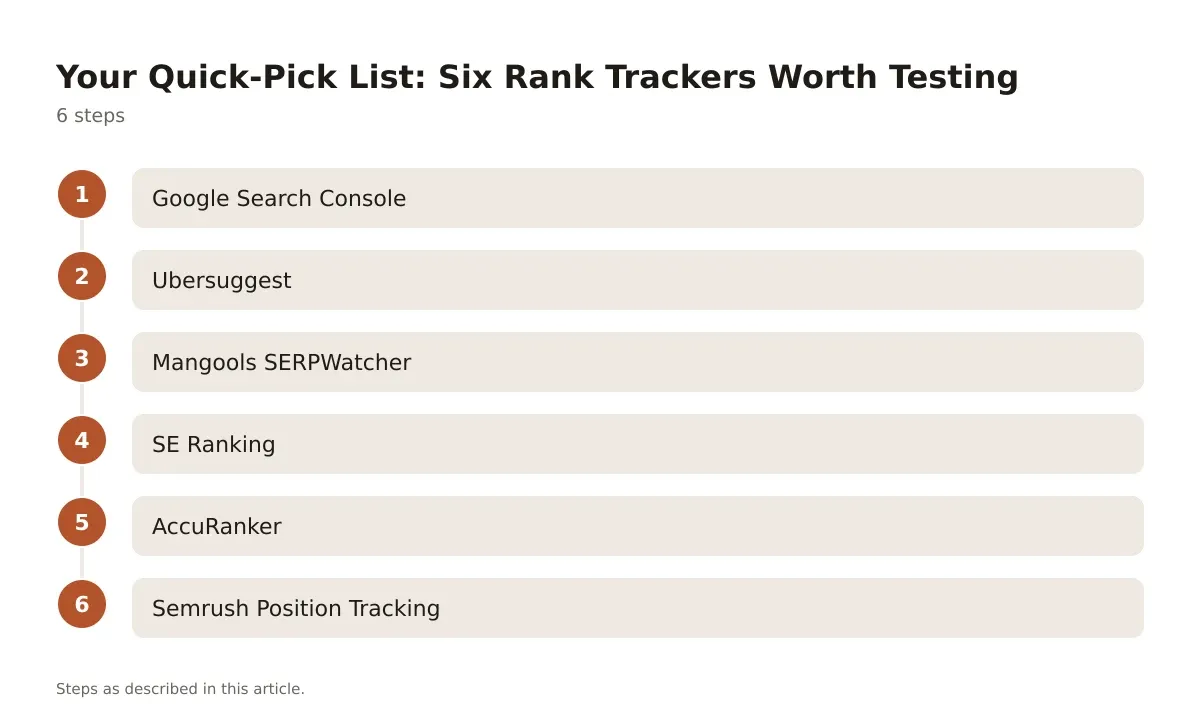
Each of these fits a different stage of agency growth. You don’t need AccuRanker’s volume pricing if you’re managing three small local clients. You do need it if you’re tracking 5,000 keywords across twenty accounts and can’t afford a crawl that lags two days behind.
Google Rank Tracker Free Options: Where They Stop Being Enough
Google Search Console is free and it’s the only tool on this list pulling data straight from Google’s own index. It shows average position, impressions, and clicks per query, and there’s no limit on how many sites you verify under one account.
The catch: it doesn’t track competitor rankings, doesn’t show daily position history in a usable trend chart, and caps out around 1,000 queries per page/date combination. That’s fine for a single-location client with a focused keyword list. It falls apart fast once you’re managing multiple clients and need to compare your position against three competitors side by side.
Ubersuggest is the other “free” option worth mentioning, though its free tier is limited to a small number of keyword lookups and tracked keywords per day. Once you need to track dozens of keywords daily across multiple client sites, you’re looking at its Individual plan from $12/mo, which still keeps things cheap relative to agency-grade tools.
Neither replaces a dedicated keyword rank tracker once you’re billing clients for SEO reporting. They’re a starting point, not a long-term agency stack.
Rank Tracker Template: Building Your Own in Google Sheets
Before you commit to a paid subscription, it’s worth knowing you can build a basic tracker yourself. Pull data from Google Search Console’s API or export CSVs weekly, then structure a Google Sheets tab with columns for keyword, URL, device, location, and position by date.
Google Search Console caps historical data at 16 months, so set a recurring calendar reminder to export monthly. Otherwise you lose the older data when the window rolls forward. A simple IMPORTRANGE formula across sheets can consolidate multiple client exports into one master view, though this gets unwieldy past five or six clients.
Pro tip: Add a conditional formatting rule that flags any keyword dropping more than 3 positions week-over-week. It turns a wall of numbers into something you can scan in ten seconds before a client call.
The real limit of a spreadsheet template is automation. You’re manually pulling and pasting data every week, and there’s no mobile-versus-desktop split unless you build it yourself from separate exports. It works for a one-person shop with two or three clients. It stops working the moment you’re managing real volume.
Mangools SERPWatcher and SE Ranking: Mid-Tier Agency Picks
Mangools SERPWatcher starts at $29.90/mo (billed annually) and is built around visual SERP history charts that estimate traffic impact per keyword. It’s part of the broader Mangools suite, so higher tiers bundle in KWFinder for keyword research, SERPChecker, LinkMiner, and SiteProfiler. Plans differ mainly by how many keywords you track and how many lookups you get per day, not by locking features behind higher tiers.
What it’s bad at: it’s not built for huge keyword portfolios. If you’re tracking thousands of terms across dozens of domains, the interface and pricing structure start working against you. It’s a strong fit for a two-to-five person agency managing a handful of client sites who want clean visuals for client decks.
SE Ranking starts at $65/mo (billed annually) and leans harder into the agency use case with white-label reporting and client management baked in. It combines rank tracking with site audit, backlink monitoring, and an on-page checker in the same subscription, so you’re not stitching together three separate tools for a single client report.
The trade-off is that SE Ranking’s keyword and tracked-site quotas scale with your plan, so a growing client roster means moving up tiers faster than you might with a more narrowly-focused tracker. For agencies that want one dashboard instead of five, it’s worth the jump from the $65/mo starting point.
AccuRanker vs Semrush Position Tracking: The Volume Players
This is the head-to-head that matters once you’re past ten clients and juggling real keyword volume.
AccuRanker: Built for Speed and Accuracy
AccuRanker starts from $109/mo (billed annually), with Professional and Enterprise tiers priced on a custom, volume-based basis. It’s built specifically for agencies managing large keyword portfolios who need fast, accurate daily updates. It supports local, mobile, and multi-search-engine tracking across Google, Bing, YouTube, and Amazon, plus white-label PDF and Looker Studio reporting with API access.
What it’s bad at: it’s a dedicated rank tracker, not an all-in-one SEO suite. You won’t get backlink analysis or site audits here. If you want one platform for everything, this isn’t it. You’re paying for tracking speed and accuracy, full stop.
Semrush Position Tracking: Best If You’re Already on Semrush
Semrush Position Tracking comes included with a Semrush subscription starting at $139.95/mo for the Pro plan. It tracks rankings by device, by location down to the zip code, and by search engine, with built-in competitor comparison. The number of tracked keywords and projects scales with your Semrush tier.
The catch is the price floor. You’re not buying rank tracking alone, you’re buying Semrush’s entire research and competitive analysis platform, and the tracking feature comes along for the ride. If your agency already uses Semrush for keyword research and competitor audits, the tracking module is close to free marginal value. If you don’t need the rest of the suite, you’re overpaying for a keyword rank tracker.
Choosing the Right Tool for Your Agency’s Size
A two-person shop managing five local clients doesn’t need AccuRanker’s volume pricing or Semrush’s full research suite. Start with Google Search Console for first-party data, add Mangools SERPWatcher once a client asks for cleaner visual reports, and keep it there until keyword volume genuinely outgrows it.
An agency pushing past fifteen or twenty clients needs daily accuracy and white-label reporting built in from day one. That’s where SE Ranking or AccuRanker start paying off, because the time saved building manual reports starts to matter more than the monthly bill. If your team already lives inside Semrush for research and competitive tracking, bolting on Position Tracking is the path of least resistance rather than adding a fifth tool to the stack.
Don’t pick based on brand recognition alone. Pick based on how many keywords you’re actually tracking this month, whether your clients care about mobile-specific data, and whether you’re the one building reports by hand or handing that job to software.
Picking the Right Keyword Rank Tracker for Where You Are Now
There’s no single best keyword rank tracker for every agency. The right pick depends on how many clients you’re managing, whether they care about mobile-specific rankings, and how much time you’re willing to spend building reports by hand versus paying for automation.
Start free if you’re testing the waters: Google Search Console gives you real data straight from Google at zero cost, and a Google Sheets template can fill the gaps if you’re patient enough to update it weekly. Once client volume grows past what a spreadsheet can handle, move to a dedicated tool. Mangools SERPWatcher and SE Ranking sit in the affordable middle, while AccuRanker and Semrush Position Tracking earn their higher price tags once you’re tracking thousands of keywords across a real client roster.
If you’re still weighing the free-versus-paid decision, our deeper comparison of free rank tracking tools breaks down exactly where each free plan’s limits start to hurt. Whatever you choose, the goal is the same: catch ranking movement before your client does, and spend your billable hours on strategy instead of chasing numbers in a spreadsheet.
Frequently asked questions
What is the most accurate keyword rank tracker for agencies?
Accuracy depends more on crawl frequency and location specificity than brand name. AccuRanker is built specifically around fast, frequent crawls and is often chosen by agencies that need daily, location-accurate data across large keyword sets. Google Search Console is accurate in the sense that it’s Google’s own data, but it reports aggregated positions rather than a clean daily snapshot per keyword.
Can I track keyword rankings for free?
Yes, Google Search Console is free with no cap on verified sites, though it limits historical data to the last 16 months and around 1,000 queries per page/date combination. Ubersuggest also offers a free tier, but it limits daily keyword lookups. For a closer look at where each free option’s limits show up, see our free rank tracking tools comparison.
How often should an agency check keyword rankings?
Daily tracking is standard for agency client work because weekly or monthly checks miss day-to-day volatility that affects traffic and client perception. For low-priority or long-tail keywords, weekly checks are usually enough. Core revenue-driving keywords should be checked daily so you can catch and explain drops before the client notices on their own.
Does mobile rank tracking really differ from desktop?
Yes, often significantly. Google’s mobile-first indexing means mobile SERPs can show different results, different local pack placements, and different ad layouts than desktop, which changes where organic listings actually sit. Tools like AccuRanker and Semrush Position Tracking split mobile and desktop reporting by default so you’re not reporting a blended number that doesn’t match either experience.
Is it worth paying for a rank tracker if I already use Google Search Console?
It depends on your client volume and reporting needs. Search Console is enough if you manage a handful of sites and don’t need competitor comparison or white-label reports. Once you’re tracking multiple clients, need daily updates, or have to hand clients a branded report, a paid tool like SE Ranking or AccuRanker starts saving more time than it costs.
Pricing verified 2026-10-18. Check the vendor site for the latest.




Leave a Reply