
You added structured data to a product page last month. Search Console shows “valid,” yet the snippet looks the same as before. That gap between valid and visible is where most site owners get stuck. If your markup keeps throwing warnings, start with how to solve breadcrumb schema errors before adding more types.
This guide walks through real schema markup examples: Article, FAQ, HowTo and Organization. It shows what Google reads, what it ignores, and how to test a live page.
What Schema Markup Does and Does Not Do
Schema markup is a block of structured data that describes a page to machines. Google recommends JSON-LD, and it states that structured data helps it understand page content. It is not a ranking switch.
What usually happens: valid markup makes a page eligible for a rich result. Eligible does not mean shown. Google decides per query and per site quality.
Two limits matter before you write anything. The markup must describe content visible on the page. And a type with no supported rich result still helps clarity but earns no visual change.
Check the Google Search Central structured data documentation for the current list of supported features. Google retires some of them, so a type that worked last year may now do nothing.
Article Schema Markup Examples With Before and After
Article markup tells Google the headline, author and dates. Here is a weak version:
{
 "@context": "https://schema.org",
 "@type": "Article",
 "headline": "The Complete Ultimate Guide to Everything You Need to Know About Schema Markup in WordPress for Beginners"
}
That headline runs 107 characters and repeats words. Google’s article documentation notes that headline should be concise. It also lists no required properties, only recommended ones.
A tighter version:
{
 "@context": "https://schema.org",
 "@type": "Article",
 "headline": "Schema Markup Examples for WordPress",
 "author": {
 "@type": "Person",
 "name": "Jane Reyes",
 "url": "https://example.com/authors/jane-reyes"
 },
 "datePublished": "2026-03-04T08:00:00+00:00",
 "dateModified": "2026-09-12T10:30:00+00:00",
 "image": "https://example.com/img/schema-guide.jpg"
}
That headline is 37 characters. The marked-up author must match the byline on the page. Common mistake: setting dateModified to today on every page load. Fix it by tying the value to the real edit timestamp.
HowTo Schema Markup Examples and Why Many Sites Should Skip Them
HowTo markup lists steps, tools and time. A minimal example:
{
 "@context": "https://schema.org",
 "@type": "HowTo",
 "name": "Add a canonical tag",
 "step": [
 {"@type": "HowToStep", "text": "Open the page template."},
 {"@type": "HowToStep", "text": "Insert the link rel canonical tag in the head."}
 ]
}
Google has reduced HowTo rich results sharply. Per its 2023 update, they were removed from desktop and limited on mobile, and Google’s documentation now marks the feature as deprecated. Check the current status in the docs before investing time.
This tactic is not for sites that publish short tutorials hoping for a bigger snippet. The visible gain is gone for most. The steps still read fine on the page, and that is where the value sits.
If a developer offers to template HowTo markup across 400 posts, I would say no. The effort has no reliable payoff.
Organization Schema Markup Examples for Brand Clarity
Organization markup is the one I add to nearly every site. It sits on the homepage and tells Google your name, logo and official profiles.
{
 "@context": "https://schema.org",
 "@type": "Organization",
 "name": "Example Studio",
 "url": "https://example.com",
 "logo": "https://example.com/img/logo.png",
 "sameAs": [
 "https://www.linkedin.com/company/example-studio",
 "https://www.youtube.com/@examplestudio"
 ]
}
Google’s logo guidance asks for an image that is crawlable and indexable, and the logo should suit a small square display. A thin horizontal wordmark often crops badly. The sameAs array only helps when each link points to a profile you control.
Put it on the homepage, not on every page. Repeating it sitewide adds noise and no benefit. For the wider case for structured data, see the benefits of using schema markup for SEO.
How to Test Schema Markup on a Live Page
Testing takes five minutes. Follow this order:
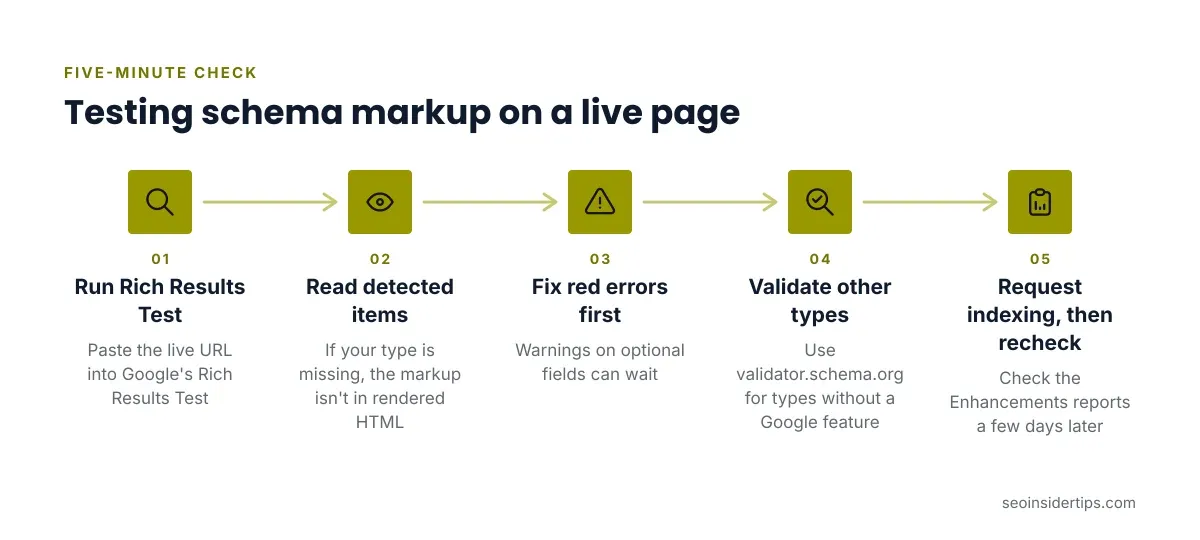
- Paste the live URL into Google’s Rich Results Test and run it.
- Read the detected items. If your type is missing, the markup is not in the rendered HTML.
- Fix every red error first. Warnings on optional fields can wait.
- Validate any type without a Google feature at validator.schema.org.
- Request indexing in Search Console, then check the Enhancements reports a few days later.
A quick check on the live page: open DevTools, search the source for application/ld+json, and confirm one block per intent. Duplicate blocks from a theme plus an SEO plugin are common. Disable one source.
Another worked fix: if the test reports “missing field image,” add an absolute URL, not a relative path like /img/a.jpg.
Schema Markup Examples: Mistakes That Make Pages Look Templated
Copying one template across every URL is the fastest route to bad data. Four problems show up repeatedly:
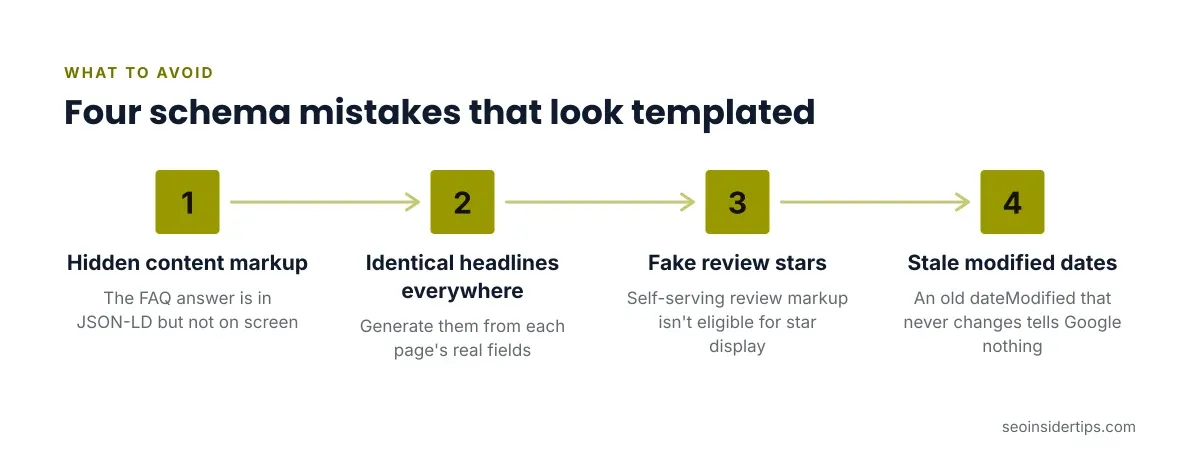
- Marking up hidden content. The FAQ answer exists in JSON-LD but not on screen. Show it or remove it.
- Identical headlines and descriptions on every page. Generate them from each page’s real fields.
- Fake review stars. Self-serving review markup on your own business is not eligible for star display.
- Stale dates. An old
dateModifiedthat never changes tells Google nothing.
Sites that vary markup by content type tend to stay clean. A recipe page, a service page and a news post each need different properties, and a plugin that outputs one generic block for all three is doing less than you think.
Choosing the Right Schema Markup Examples for Your Site
Start with intent, not with a list of types. Ask what the page is and what Google supports for it.
A blog needs Article. A homepage needs Organization. A product page needs Product with price and availability that match the visible offer. A local business needs LocalBusiness with a consistent name, address and phone. Breadcrumbs help almost every site with a clear hierarchy.
Skip the rest until the basics validate. Adding six types to one page does not stack benefits. It raises the chance of conflicts.
If you run WordPress, a plugin such as Yoast SEO or Rank Math can output Article, Organization and breadcrumb markup. Check what it already prints before adding custom code. Duplication is the usual outcome of doing both.
Getting the Most From Your Schema Markup Examples
Good structured data is boring on purpose. It matches the page, validates cleanly and stays current. The Article and Organization examples above cover most blogs. FAQ and HowTo are worth adding only when they cost nothing and the content is already visible.
Do not expect a ranking jump. What you can expect is cleaner understanding by Google and, for supported types, eligibility for richer display. Results depend on the site, the query and Google’s current feature set.
Build one clean block per page type, test it on the live URL, and revisit it when Google updates its documentation. If errors persist after that, solve breadcrumb schema errors first, since they are the most common failure I see.
FAQ Schema Markup Examples and the Rich Result Reality
FAQ markup wraps visible questions and answers. Here is the structure:
{
 "@context": "https://schema.org",
 "@type": "FAQPage",
 "mainEntity": [{
 "@type": "Question",
 "name": "Does schema markup improve rankings?",
 "acceptedAnswer": {
 "@type": "Answer",
 "text": "Not directly. It helps Google understand the page and can make it eligible for rich results."
 }
 }]
}
Here is the part many tutorials skip. Google announced in August 2023 that FAQ rich results would show only for well-known, authoritative government and health sites. For most commercial blogs, this markup no longer produces the expandable snippet.
So should you still add it? I would, only when the FAQ is already on the page and the markup costs you nothing. I would not build a page around it. Never mark up questions that are not visible to the reader. Google treats that as a spam policy violation.



Leave a Reply