
Here’s an unpopular opinion: most site owners spend way too much time staring at Domain Rating and not enough time asking what a link actually does. A backlink checker free of charge won’t tell you if a link sends traffic or whether Google even counts it. It gives you a rough map, not a verdict.
That said, a free tool is still the right starting point for most small sites. You just need to know what the numbers mean, where each tool’s data runs out, and when to stop trusting a score and go check Google Search Console instead. If your link profile needs cleanup rather than growth, you’ll eventually want to build backlinks without paying rather than chase another metric.
What a backlink checker actually measures
Every third-party backlink checker crawls the web on its own schedule, finds links pointing at a domain, and scores them using a proprietary formula. None of these scores are Google ranking signals. Domain Rating, Domain Authority, Authority Score, whatever a vendor calls it, these are each tool’s private guess at how much link equity a site has accumulated.
That distinction matters because site owners routinely confuse a high third-party score with Google trust. They’re correlated, loosely, but not the same thing. Ahrefs built Domain Rating from its own crawl database. Moz built Domain Authority from a separate one. Neither has access to Google’s actual index or its ranking algorithm, so their scores will disagree with each other and with how a page actually performs in search.
What you can trust from these tools is the raw data: which URLs link to you, what anchor text they use, and whether the link is marked nofollow or dofollow. That’s observable, crawled data. The authority score layered on top is an estimate, useful for comparing your own progress over time, less useful as an absolute truth.
Picking a tool that fits a small site’s budget
A small site doesn’t need an enterprise link-intelligence platform. It needs enough visibility to catch new links, spot toxic ones, and track anchor text diversity without paying for a seat it’ll barely use. Here are 5 tools worth knowing before you commit to one.
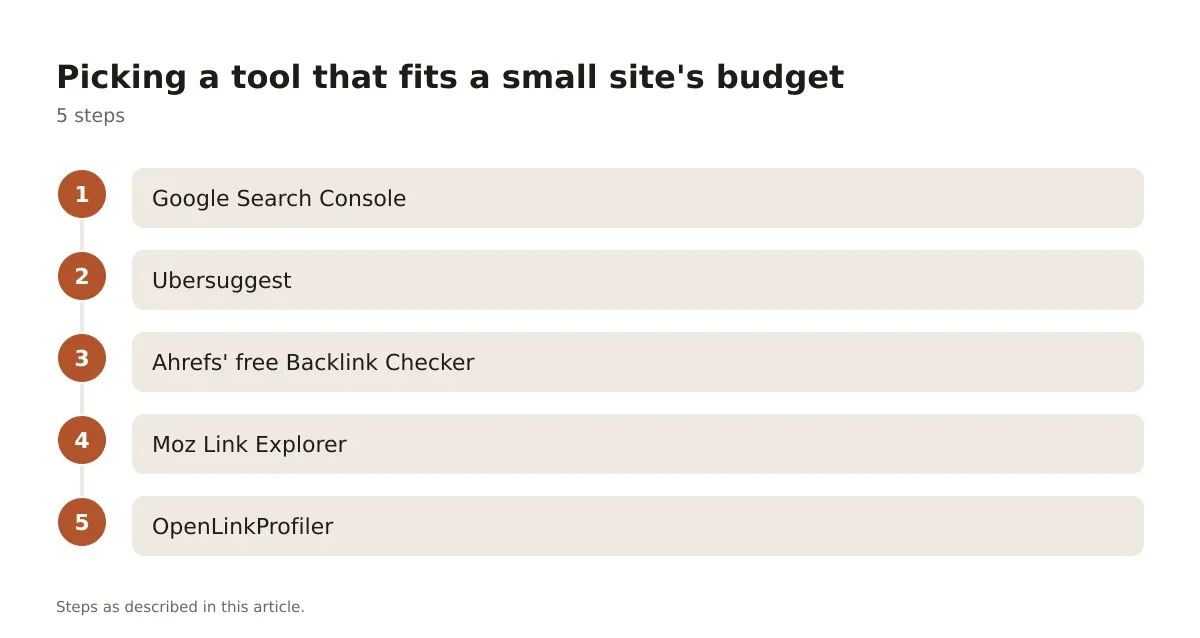
- Google Search Console – free, official, limited to links Google has already indexed and chosen to report.
- Ubersuggest – free tier with capped daily lookups, paid plans starting at a low monthly price for more.
- Ahrefs’ free Backlink Checker – shows a capped list of your top backlinks with no login required.
- Moz Link Explorer – free tier shows a sample of links and your Domain Authority score.
- OpenLinkProfiler – free, no signup, decent for a quick gut-check on smaller sites.
None of these free tiers show your complete backlink profile. They’re all teasers for paid plans, and that’s fine, as long as you know that going in.
Google Search Console: the one source that isn’t guessing
Start here, always. Google Search Console pulls its Links report directly from Google’s own index, not a third-party crawl. It’s free, with no paid tier, and it’s the closest thing to ground truth you’ll get.

Open Search Console > Links and you’ll see two tables: Top linking sites and Top linking text. Click into the external links report and you can export every linking domain Google has indexed. This won’t be exhaustive, Google doesn’t publish its full link graph, but it shows you links Google has actually crawled and associated with your domain.
The catch: GSC backlinks don’t update in real time. Google’s own documentation on the Links report doesn’t commit to a fixed refresh schedule, so treat the data as directionally current rather than live. If you published new content three days ago and got a link from a news site yesterday, don’t expect it to show up tomorrow morning.
Comparing the main free options side by side
Google Search Console vs Ubersuggest vs Ahrefs free checker
| Tool | Data source | Data limit | Anchor text data | Refresh speed |
|---|---|---|---|---|
| Google Search Console | Google’s own index | No fixed cap, limited to indexed links | Yes, Top linking text report | Not instant, batches periodically |
| Ubersuggest | Third-party crawl | Capped lookups per day on free tier | Limited on free tier | Varies, not daily for free users |
| Ahrefs free Backlink Checker | Ahrefs’ own crawl (same engine as paid) | Shows top links only, capped count | Shown for visible links | Depends on Ahrefs’ crawl frequency |
The pattern here is consistent: free tiers show you a sample, not the whole picture. Google Search Console is the most honest about this because it’s not trying to upsell you, it simply doesn’t surface links it hasn’t crawled yet. Ahrefs and Ubersuggest cap results deliberately, as a function of their business model. None of this makes them useless, it just means you shouldn’t treat a free scan as a complete audit.
Reading anchor text without overreacting to it
An anchor text checker is really just a filtered view of the same backlink data, grouped by the clickable text used in each link. This matters more than most site owners realize, because anchor text patterns are one of the signals Google’s spam systems watch for.
Pull your anchor text report from GSC or your backlink tool of choice and group it into four buckets: branded (your company name), naked URL, generic (“click here,” “read more”), and exact-match keyword. A healthy, naturally built profile usually skews branded and naked-URL heavy, with exact-match anchors as a small minority. If you see dozens of links using the identical commercial keyword phrase, especially from low-quality or unrelated domains, that’s a pattern worth investigating rather than celebrating.
A common mistake here: site owners see a cluster of keyword-rich anchors and assume it’s proof their link building worked. Sometimes it is. Often it’s a signal that someone built or bought a batch of low-effort links using the same anchor template. Google’s spam policies call out link schemes explicitly, including “building links that use exact-match, keyword-rich anchor text in articles or guest posts.” The fix is to diversify anchor text going forward and to document which links you actually earned versus which ones showed up unexplained.
For more detail, see remove toxic backlinks.
Checking a competitor’s backlinks without breaking your budget
An external backlink checker lets you look at someone else’s link profile, which is useful competitive reconnaissance, but the free versions cap how deep you can go here too. Most free tools will let you plug in a competitor’s domain and see their top handful of linking sites.
Here’s a worked example of how I’d actually use this. Say you run a local plumbing site and want to see where a competitor three spots above you in rankings is getting links. Drop their domain into Ahrefs’ free checker or Ubersuggest. You’ll typically see a short list, maybe 10 to 20 referring domains, sorted by the tool’s authority metric. Cross-reference those domains manually: are they local business directories, industry associations, press mentions? That pattern tells you more than the raw count does.
Don’t try to replicate their link profile exactly. Not every link a competitor has is one Google rewards, and some may even be links you’d want to avoid, bought placements or link farm entries that haven’t hurt them yet but could eventually. Use the external view for pattern recognition, not a shopping list.
Spotting toxic links before they become a problem
A free backlink checker free from cost doesn’t automatically flag toxic links accurately, no matter what the dashboard color-coding implies. “Toxicity scores” are another proprietary estimate, built from signals like spammy TLDs, link farm patterns, and anchor text abuse. They’re a starting filter, not a verdict.
What actually matters is manual review of anything that looks unnatural: sudden spikes in referring domains, links from obviously unrelated foreign-language sites, or domains that exist purely to host outbound links. If you find a cluster like that, don’t panic and disavow everything. Google’s own guidance is that disavowing is for cases of real, demonstrable harm, like a manual action or a clear negative SEO pattern, not routine cleanup.
If you do find genuine spam pointing at your domain, the process for removing toxic backlinks starts with outreach to the linking site, and only moves to the disavow tool as a last resort. Jumping straight to disavowing everything that looks unfamiliar is one of the more common overcorrections I see, and it can strip out neutral or even helpful links along with the bad ones.
Earning links instead of chasing scores
The healthiest use of any backlink checker free or paid is as a feedback loop for outreach, not a scoreboard to game. Once you know who already links to you and why, you can find more sites like them.
A workable outreach process for a small site: export your current linking domains, sort by relevance to your niche rather than authority score, and note what kind of content earned each link. Then build a short list of 15-20 similar sites, blogs, resource pages, local organizations, that haven’t linked yet. Pitch something specific, a data point, a tool, a genuinely useful resource, not a generic “check out our site” email. This is slower than buying links, but it’s also the version that doesn’t put your site at risk under Google’s link spam policies.
Scaled link schemes, PBNs, bulk guest post networks, and reciprocal link exchanges all carry real risk once they’re done at volume. A backlink checker helps you see when your own profile starts looking like one of these patterns, usually a sudden burst of similar-anchor links from similar domains in a short window.
When to stop checking and start building
Checking backlinks is diagnostic work. It tells you where you stand. It doesn’t move you forward on its own, and site owners who check weekly without acting on what they find are just collecting data for its own sake.
A reasonable cadence: run a full check monthly using GSC as your baseline and a free third-party tool for the anchor text and authority context. Compare month over month for new links, lost links, and anchor text drift. If something looks off, a sudden new domain with dozens of exact-match anchors, verify it before deciding whether to leave it alone or request removal.
Choosing the right free backlink checker for your site
There’s no single best free backlink checker for every situation, and that answer depends entirely on what you’re trying to find out. If you want the most accurate picture of what Google itself has indexed, Google Search Console wins, full stop, because it’s not an estimate. If you want fast competitive snapshots or anchor text patterns across a wider set of domains, a third-party external backlink checker like Ahrefs’ free tool or Ubersuggest fills that gap, with the understanding that you’re seeing a capped sample.
The mistake to avoid is treating any single tool’s authority score as gospel, or assuming a clean-looking dashboard means your link profile is safe. Use multiple tools, cross-reference what they show, and always treat the free tier as a sampling window rather than a full audit.
Build the habit of checking monthly, acting on what you learn, and spending more energy earning relevant links than optimizing a score nobody outside your own dashboard can see. That’s a more durable path than any one-time scan, free or paid, will ever give you.
Frequently asked questions
Is a free backlink checker accurate enough to trust?
It’s accurate for what it actually measures: links the tool’s crawler has found. It’s not a complete picture, and free tiers cap how many results you see. Treat it as a sample for directional insight, not a full audit of your link profile.
How is Google Search Console different from third-party backlink checkers?
Google Search Console shows links that Google itself has indexed and attributed to your site, pulled straight from Google’s own crawl data rather than a third-party database. Third-party tools like Ahrefs or Ubersuggest run their own independent crawls, so their lists often differ from what GSC shows, sometimes by a lot.
Can a bad backlink actually hurt my rankings?
Most low-quality links are simply ignored by Google’s algorithm rather than actively penalized. Real harm usually comes from large-scale, obviously manipulative link schemes or a manual action, not a handful of random spammy links. Check Google Search Console for manual actions before assuming a backlink is the cause of a ranking drop.
Should I disavow every suspicious-looking backlink I find?
No. Google’s guidance treats the disavow tool as a tool for clear cases of harm, not routine cleanup of unfamiliar links. Start with outreach to request removal, and reserve disavowing for links tied to a manual action or an obvious, large-scale spam pattern.
How often should I check my backlink profile?
Monthly is a reasonable cadence for most small to midsize sites. Use that check to compare new links, lost links, and anchor text trends against the previous month, and investigate anything that spikes suddenly rather than waiting for a quarterly review.



Leave a Reply