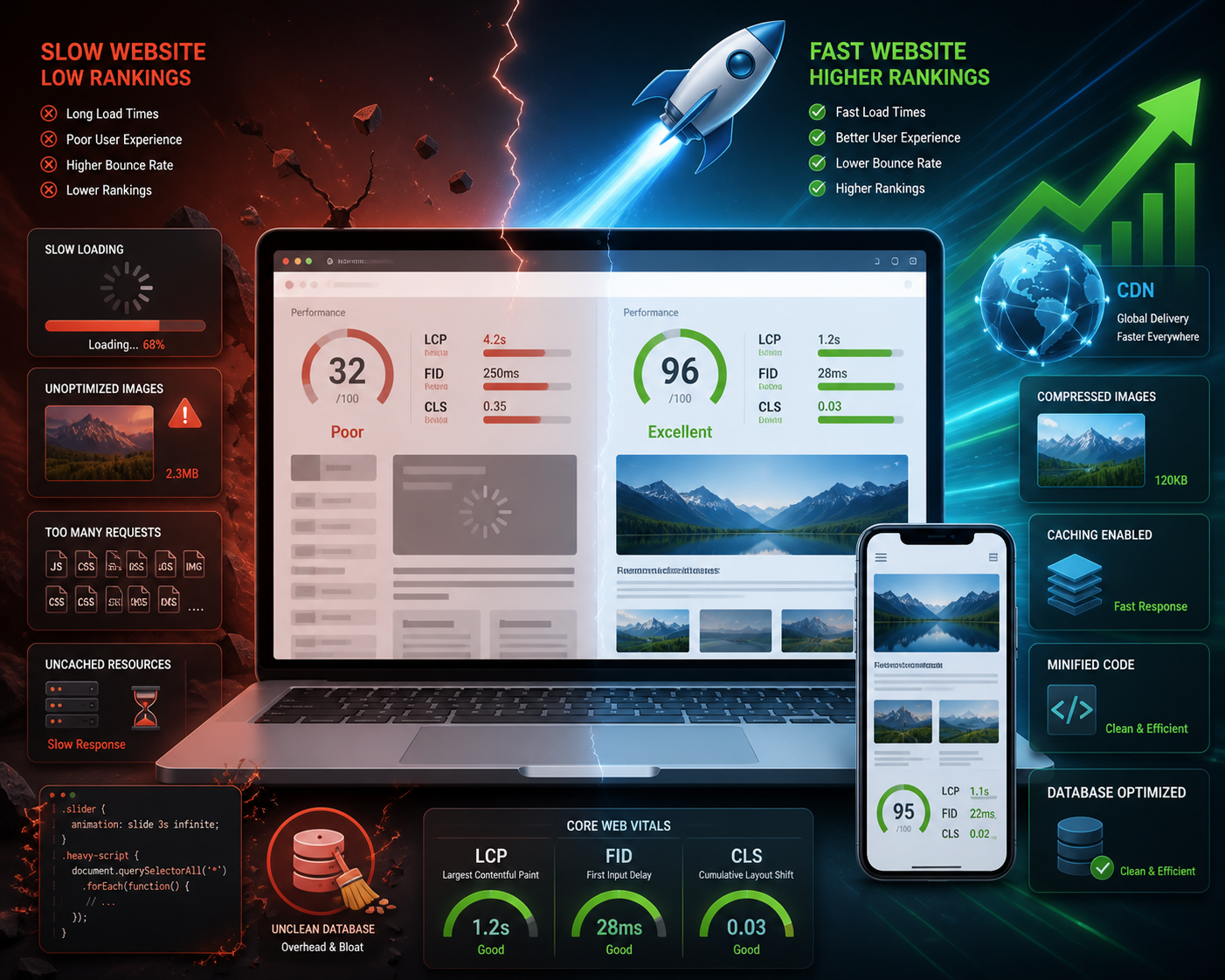
WordPress sites loading slower than 2.5 seconds lose 20-30 search ranking positions according to Google‘s Core Web Vitals data. Fast sites earn featured snippets and higher click-through rates consistently.
Speed optimization involves more than caching plugins alone. Google measures Largest Contentful Paint (LCP), First Input Delay (FID), and Cumulative Layout Shift (CLS) as direct ranking factors. Sites mastering these metrics outrank competitors with identical content quality.
Compress Images and Media Files
Large images destroy LCP scores within seconds of page load. A 2MB hero image adds 8 seconds to mobile load time on 3G connections. This kills user experience immediately.
WebP format reduces file sizes by 25-35% compared to JPEG without quality loss. WordPress 5.8+ supports WebP natively through media uploads. Smush converts existing images automatically, processing 50 images per batch on free accounts.
Set explicit width and height attributes on all images. This prevents layout shifts during loading. Add `loading=”lazy”` to below-fold images and `fetchpriority=”high”` to hero images for 40-60% CLS improvement.
Proper image optimization reduces bandwidth usage by 60-70% while maintaining visual quality. Sites implementing WebP conversion see 2-3 second load time reductions on image-heavy pages.
Select Performance-Optimized Hosting
Your hosting provider controls TTFB (Time to First Byte) more than plugins. Shared hosting delivers 800-1200ms TTFB consistently. Managed WordPress hosts achieve 200-400ms response times.
WP Engine and Kinsta use Google Cloud Platform with built-in caching layers. Their servers respond 3x faster than budget shared hosting. Expect $30-35 monthly costs versus $5-10 for shared plans.
Server location impacts global performance significantly. Cloudflare serves content from 200+ edge locations worldwide. This reduces international load times by 40-50% for $20 monthly on pro plans.
Database optimization becomes critical above 10,000 monthly visitors. Managed hosts include automatic cleanup removing spam comments and post revisions. Self-hosted sites need WP-Optimize for maintenance automation.
Configure Comprehensive Caching
Caching converts dynamic WordPress pages into static HTML files. This reduces server processing from 500-800ms to 50-100ms per request. The difference transforms user experience.
WP Rocket provides complete caching at $59 annually. It includes page caching, browser caching, and GZIP compression automatically. The setup wizard configures optimal settings without technical knowledge.
W3 Total Cache offers similar features free. However, configuration requires technical expertise to avoid plugin conflicts. Most users struggle with proper setup.
Enable essential features through Settings > WP Rocket > Basic. Page caching stores complete HTML. Browser caching tells browsers to store files locally for 1 year. GZIP compression reduces transfer sizes by 70%. Object caching stores database queries in memory, reducing MySQL load by 60-80%.
Optimize CSS and JavaScript Loading
Render-blocking resources delay First Contentful Paint by 1-3 seconds. CSS files in `
` sections must load completely before browsers display content. Users see blank screens during this delay.Critical CSS extraction inlines above-the-fold styles directly in HTML. WP Rocket generates this automatically for each template. This reduces render-blocking time by 40-60%.
JavaScript should load after content appears. Add `defer` attributes to non-essential scripts for better performance. Font loading impacts user experience significantly.
Use `font-display: swap` in CSS to show fallback fonts immediately while custom fonts load. This prevents invisible text during font loading. Perceived performance improves by 30-40%.
Remove Unnecessary Plugins and Themes
Every active plugin adds database queries and HTTP requests. Deactivated plugins consume server resources through database entries and file system overhead. Clean sites perform better.
Audit plugins monthly using Query Monitor to identify bottlenecks. This free plugin shows exact query times and memory usage per plugin. Remove plugins generating 100+ database queries per page load.
Multipurpose themes like Avada load 50-80 CSS and JavaScript files by default. Lightweight themes such as GeneratePress or Astra load 5-10 files maximum. The reduction improves LCP by 800-1200ms.
Regular cleanup prevents bloat accumulation over time. Delete unused themes, plugins, and media files quarterly. WP-Sweep automates database cleanup by removing orphaned metadata and spam content.
Clean Your WordPress Database
Database bloat accumulates through post revisions, spam comments, and plugin data. A typical 2-year-old site contains 40-60% unnecessary entries slowing query performance. Cleanup delivers immediate improvements.
Post revisions multiply content storage by 10-20x over time. Limit revisions to 3 per post through wp-config.php modifications. This prevents excessive database growth while maintaining backup functionality.
WP-Optimize handles comprehensive maintenance automatically. Schedule weekly cleanups removing spam comments, expired transients, and orphaned metadata. This typically reduces database size by 30-50% on established sites.
Table optimization defragments MySQL storage similar to disk defragmentation. Run OPTIMIZE TABLE commands monthly through phpMyAdmin. Expect 10-15% query speed improvements on databases over 100MB.
Deploy Content Delivery Networks
CDNs distribute static files across global server networks. Visitors download images, CSS, and JavaScript from nearest geographic locations. This reduces international load times by 200-400ms.
Cloudflare offers free CDN services with 200+ edge locations worldwide. Premium plans include image optimization and mobile-specific compression improving performance scores further. Setup takes 15 minutes maximum.
Configure CDN integration through caching plugin settings. WP Rocket connects to Cloudflare automatically when you enter API keys. This enables automatic cache purging when updating content.
DNS resolution speed affects initial connection time significantly. Cloudflare DNS responds in 14ms globally compared to 50-100ms for typical hosting DNS. Switch domain nameservers to Cloudflare for additional performance boosts.
Achieving Consistent WordPress Performance Results
WordPress speed optimization requires ongoing maintenance rather than one-time fixes. Performance degrades naturally as you add content, install plugins, and attract traffic. Regular monitoring prevents regression.
Monitor Core Web Vitals scores monthly through Google Search Console. LCP should stay below 2.5 seconds, FID under 100ms, CLS below 0.1 for good ratings. Sites meeting thresholds see 15-25% better search rankings.
Test major changes on staging environments before production deployment. Most managed WordPress hosts provide staging automatically. WP Staging creates local copies for testing without affecting live sites.
Performance budgets prevent speed regression over time. Set limits like “homepage under 2 seconds” and enforce through automated testing. Regular maintenance schedules prevent decay: update plugins monthly, optimize databases quarterly, audit assets every 6 months.
Frequently asked questions
How long does it take to see ranking improvements after optimizing WordPress speed?
Google updates Core Web Vitals scores every 28 days based on real user data. Expect initial ranking improvements within 4-8 weeks of implementing optimizations, with full impact visible after 2-3 months of consistent performance.
Should I use multiple caching plugins for better performance?
Never run multiple caching plugins simultaneously as they create conflicts and slow your site. Choose one comprehensive solution like WP Rocket or W3 Total Cache, then add specialized plugins for specific needs like image optimization.
What’s the minimum acceptable loading speed for WordPress SEO?
Google recommends LCP under 2.5 seconds, but competitive niches require faster speeds. Aim for 1.5-2 second load times to outrank competitors consistently. Sites loading under 1 second earn featured snippets most frequently.
Do speed optimizations work the same on mobile and desktop?
Mobile optimization requires different priorities due to slower connections and limited processing power. Focus on image compression, critical CSS, and reducing JavaScript for mobile users since Google uses mobile-first indexing.
How much should I budget for WordPress speed optimization tools?
Essential optimization costs $100-200 annually including premium caching plugins ($59), CDN services ($240), and monitoring tools ($120). Managed hosting adds $200-400 yearly but includes many features automatically, reducing plugin costs.

Leave a Reply