Do you really need a $200 monthly subscription to rank a ten-page local site? Usually not. Most small businesses need three things: crawl checks, keyword data, and rank tracking.
I judged each tool on four criteria: how much a small team gets from the free tier, how steep the learning curve is, what it cannot do, and how the pricing is built. Free tiers change often, so confirm limits on each vendor’s page before you commit.
Table of contents
- The shortlist
- 1. Google Search Console: the free baseline
- What it does well
- Where it falls short
- Pricing
- Who should pick it
- 2. Ahrefs Webmaster Tools: free audits with real backlink data
- What it does well
- Where it falls short
- Pricing
- Who should pick it
- 3. Semrush: broad research, with a catch
- What it does well
- Where it falls short
- Pricing
- Who should pick it
- 4. Screaming Frog SEO Spider: a crawler that runs on your desktop
- What it does well
- Where it falls short
- Pricing
- Who should pick it
- 5. Rank Math: on-page help inside WordPress
- What it does well
- Where it falls short
- Pricing
- Who should pick it
- 6. BrightLocal: for businesses that serve a place
- What it does well
- Where it falls short
- Pricing
- Who should pick it
- 7. Surfer SEO: content briefs, not a full suite
- What it does well
- Where it falls short
- Pricing
- Who should pick it
- 8. SEOquake: quick checks while you browse
- What it does well
- Where it falls short
- Pricing
- Who should pick it
- Side by side
- How to choose
- Who should skip these
- Building your small-business stack
- Frequently asked questions
- Can I do SEO with only free tools?
- Which tool should a beginner install first?
- Do I need a rank tracker?
- Is a WordPress SEO plugin enough?
The shortlist
| Rank | Product | Best for | Price |
|---|---|---|---|
| 1 | Google Search Console Editor’s pick | Seeing how Google actually treats your site | Free |
| 2 | Ahrefs Webmaster Tools | Free audits and backlink data for your own site | Free for verified sites |
| 3 | Semrush | Keyword research and competitor gaps | Free tier, then paid plans |
| 4 | Screaming Frog SEO Spider | Technical crawls on small sites | Free tier, then annual licence |
| 5 | Rank Math | On-page SEO inside WordPress | Free tier, then paid plans |
| 6 | BrightLocal | Local rankings and citations | Subscription, mid-range |
| 7 | Surfer SEO | Content briefs for writers | Paid plans only |
| 8 | SEOquake | Quick on-page checks while browsing | Free browser extension |
1. Google Search Console: the free baseline
Editor’s pick: It is the only tool that shows Google’s own data about your site, and it costs nothing.
Search Console reports what Google really saw. That beats any third-party estimate. Start by verifying a Domain property, which covers every subdomain and protocol in one view.
What it does well
- The Performance > Search results report shows real queries, clicks, impressions and average position.
- Filtering by page reveals which queries each URL already ranks for.
- The URL Inspection tool shows whether a page is indexed and which canonical Google picked.
- Indexing > Pages lists why URLs were left out, such as “Crawled – currently not indexed”.
- The Sitemaps report confirms Google can read your submitted sitemap.
- Core Web Vitals and mobile usability issues appear per URL group.
- Email alerts flag manual actions and new indexing problems.
Where it falls short
It has no competitor data and no keyword suggestions. The interface also shows only a sample of what it holds, so treat the numbers as directional.
Pricing
Free.
Who should pick it
Every site owner, before anything else. A common mistake is reading average position as a fixed rank. It is an average across many searches, locations and devices. Filter to one query and one page before drawing conclusions.
2. Ahrefs Webmaster Tools: free audits with real backlink data
If you could pick one free tool beyond Google’s, this is it. You verify a site you own, and you get a crawler plus backlink and keyword data for that site.
What it does well
- Site Audit crawls your pages and flags broken links, redirect chains and missing titles.
- Backlink data comes from a large, well-regarded index.
- Organic keywords show where you already rank.
- You can schedule recurring audits.
- Issues come with plain explanations.
Where it falls short
It only works on sites you can verify, so you cannot study competitors. Keyword research for new topics is limited. See the official page for current features.
Pricing
Free for verified sites, with paid Ahrefs plans for wider research.
Who should pick it
Owners who want a second opinion on technical health. I would run one audit, fix the errors, then re-crawl instead of obsessing over the score. If you want the full-suite comparison, our Semrush vs Ahrefs breakdown covers it.
3. Semrush: broad research, with a catch
Semrush covers keywords, competitors, audits and tracking in one place. That breadth is its strength. It is also why small teams overpay for features they never open.
What it does well
- Keyword Magic Tool groups ideas by topic and shows difficulty.
- Competitor comparison reveals keywords rivals rank for and you do not.
- Position Tracking monitors chosen terms over time.
- Site Audit covers technical checks.
- Reports can be exported for clients.
Where it falls short
The free tier is tight on daily queries and projects. Paid plans are subscriptions priced for agencies, so a solo owner often uses a fraction of them.
Pricing
Free tier with limits, then paid plans.
Who should pick it
Marketers who research competitors weekly. If you only publish a few posts a month, skip it for now. Our free vs paid tools roundup helps you decide.
4. Screaming Frog SEO Spider: a crawler that runs on your desktop
Screaming Frog crawls your site like a search engine and lists what it finds. It runs locally, so there is no cloud account to manage.
What it does well
- Finds broken links, redirects and duplicate titles fast.
- Exports raw data to spreadsheets.
- Shows missing meta descriptions and H1s.
- Can crawl with JavaScript rendering enabled.
Where it falls short
The interface looks dated and feels technical. The free version caps how many URLs it crawls, which is plenty for a small brochure site.
Pricing
Free tier with a crawl limit, then an annual licence.
Who should pick it
Anyone comfortable with spreadsheets. A typical mistake is crawling without noting the settings, then comparing two crawls that used different options. Keep the configuration consistent.
5. Rank Math: on-page help inside WordPress
Rank Math adds an SEO panel to each post and page. It checks titles, descriptions and focus keywords while you write.
What it does well
- Edit titles and descriptions under Rank Math > Titles & Meta.
- Schema markup options cover common types like Article and FAQ.
- Built-in redirect manager handles 301s.
- Sitemap generation is automatic.
Where it falls short
It only works on WordPress. Its checklist score can push you toward keyword repetition. Ignore the green dot when the copy reads worse.
Pricing
Free tier, then paid plans.
Who should pick it
WordPress owners who want guardrails. Pair it with the mobile checks in our mobile-first indexing guide.
6. BrightLocal: for businesses that serve a place
If customers find you through “near me” searches, BrightLocal is built for that. It tracks local rankings and checks your listings.

What it does well
- Local rank tracking by postcode or map pin.
- Citation audits for name, address and phone consistency.
- Review monitoring across platforms.
- White-label reports for agencies.
Where it falls short
It has no real content or backlink research. Outside local SEO it does very little.
Pricing
Subscription, mid-range.
Who should pick it
Plumbers, dentists, restaurants and similar shops. It is the wrong choice for a national online store.
7. Surfer SEO: content briefs, not a full suite
Surfer analyses top-ranking pages for a keyword and suggests terms and structure. It works best as a drafting aid.
What it does well
- Content editor scores a draft against competing pages.
- Suggests related terms and headings.
- Audit tool reviews existing posts.
Where it falls short
It is not a crawler or a rank tracker. Chasing its score can produce stiff, crowded copy.
Pricing
Paid plans only.
Who should pick it
Teams publishing regularly with several writers. Skip it if you post rarely.
8. SEOquake: quick checks while you browse
SEOquake is a free browser extension. It overlays page data on search results and any site you visit.
What it does well
- Shows indexed-page counts, headings and link totals on demand.
- Highlights nofollow links.
- Exports SERP data for review.
Where it falls short
It offers no ongoing tracking and no history. Metrics are surface-level.
Pricing
Free.
Who should pick it
Beginners who want fast spot checks on their own pages and rivals.
Side by side
| Product | Price | Best for | Standout feature |
|---|---|---|---|
| Google Search Console | Free | Real Google data | Performance report |
| Ahrefs Webmaster Tools | Free for verified sites | Audits and backlinks | Free Site Audit |
| Semrush | Free tier, then paid | Competitor research | Keyword Magic Tool |
| Screaming Frog | Free tier, then licence | Technical crawls | Local desktop crawler |
| Rank Math | Free tier, then paid | WordPress on-page | Built-in schema |
| BrightLocal | Mid-range subscription | Local SEO | Citation audits |
| Surfer SEO | Paid only | Content briefs | Draft scoring |
| SEOquake | Free | Quick page checks | Browser overlay |
How to choose
Pick tools by the job you do each week. Most small sites need three: Search Console, one crawler, and one research tool. Anything beyond that is a luxury.
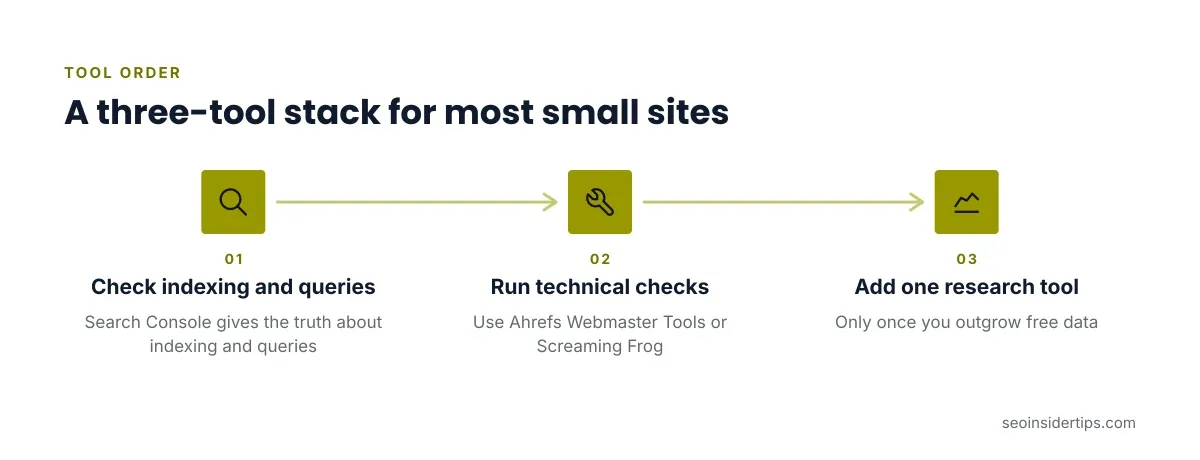
A sensible starter stack looks like this:
- Search Console for truth about indexing and queries.
- Ahrefs Webmaster Tools or Screaming Frog for technical checks.
- One research tool, only once you outgrow free data.
Who should skip these
Skip paid suites if your site has under twenty pages and you publish monthly. Skip Surfer if you write alone and rarely. Skip BrightLocal if you have no physical service area. Skip Rank Math if you are not on WordPress.
Building your small-business stack
Start free, and add paid tools only when a specific task blocks you. That might be a competitor question you cannot answer, or a crawl too big for a free cap. Review the stack every six months, because free tiers shift and your needs grow.
Rankings depend on your content, your competition and your site’s history. No tool changes that. What tools do is shorten the time between spotting a problem and fixing it.
Verify current limits and prices on each vendor’s page before subscribing. Pricing and free allowances change often.
Frequently asked questions
Can I do SEO with only free tools?
Yes, for most small sites. Search Console plus Ahrefs Webmaster Tools covers indexing, audits and backlinks. You give up competitor research and deep keyword discovery.
Which tool should a beginner install first?
Google Search Console. Verify a Domain property, submit your sitemap, and wait a few days for data. It teaches you how Google sees your site before you spend anything.
Do I need a rank tracker?
Not at first. Search Console’s average position is enough for a small site. Add a tracker when you need daily checks on a short list of terms or specific locations.
Is a WordPress SEO plugin enough?
A plugin handles on-page basics like titles, schema and sitemaps. It does not crawl your site or research keywords, so pair it with a crawler and Search Console.



Leave a Reply